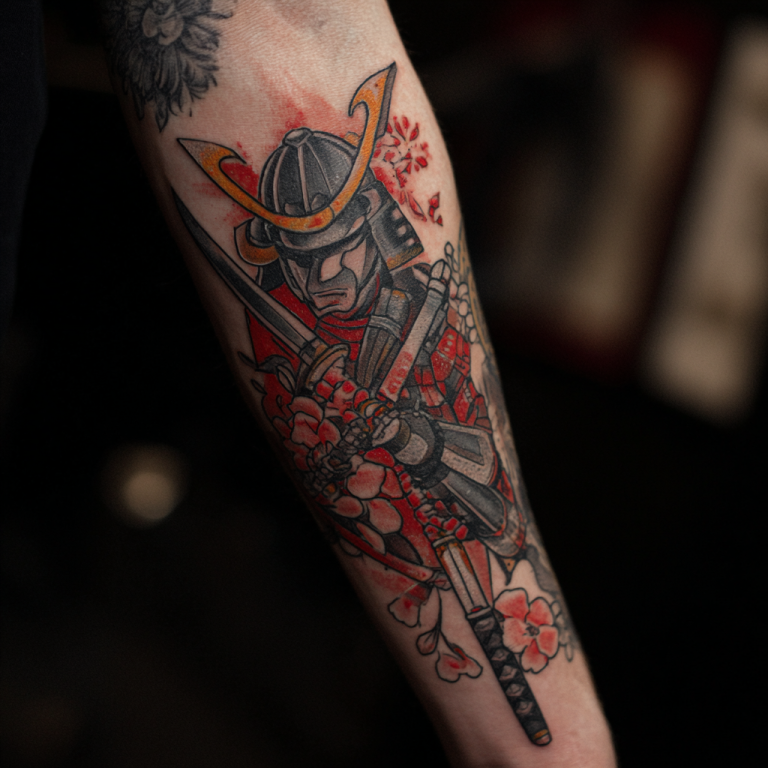
Let’s face it—AI is everywhere, and it’s even sneaking its way into the tattoo world. Whether you love it or hate it, AI tools can help you design some pretty killer tattoos. But here’s the thing: just because you can use AI doesn’t mean you should skip the human touch.
This article isn’t about picking sides—it’s about showing you how to use AI to design your tattoo and still get it inked by a real artist who knows their stuff.
What Is AI Tattoo Design?
AI tattoo design is exactly what it sounds like—using artificial intelligence to create custom tattoo ideas. Tools like DALL-E, MidJourney, or other image generators can whip up detailed designs in seconds based on the prompts you give them.
Want a biomechanical dragon that wraps around your forearm? Type it in, and boom—instant inspiration.
But here’s the catch: AI doesn’t know your story. It doesn’t know how that dragon needs to flow with your body or how to make it personal. That’s where a real tattoo artist comes in.
How to Use AI to Design Your Tattoo
- Choose Your Tool
There are tons of AI tools out there, but the best ones for tattoos are the ones that focus on high-quality, artistic images. Popular options include:- MidJourney (great for surreal and creative designs)
- DALL-E (excellent for generating unique concepts)
- Artbreeder (good for creating custom faces or detailed portraits)
- Get Specific with Prompts
AI tools work best when you’re detailed. Instead of typing “dragon tattoo,” try “realistic black-and-gray dragon with sharp scales, wrapping around a forearm.” The more info you give, the closer the result will be to your vision. - Tweak the Design
AI isn’t perfect. You might end up with something cool, but chances are, it won’t be tattoo-ready. Use the AI-generated image as a starting point and tweak it to make it yours. - Work with a Tattoo Artist
Bring the AI design to your artist and let them refine it. AI doesn’t understand the human body—your artist will make sure the design flows with your muscles and sits right on your skin.
Should You Hire an Artist Instead?
Absolutely. AI is great for brainstorming, but a tattoo artist can turn that reference into a design made for your placement and preferences. Talk through what you want to keep, what needs redrawing, and which details matter to your story.
Here’s why hiring an artist matters:
- Customization: AI doesn’t know you. A real artist will take your story and make it personal.
- Body Flow: Tattoos need to move with your body. An artist will design something that fits, not just something that looks cool in a flat image.
- Professional Experience: Ask your artist which lines and small details are practical at your chosen size, and what they would simplify. An AI preview cannot guarantee how a finished tattoo will look years later.
The Hybrid Approach: AI + Artist
The best way to use AI in tattoo design? Combine it with an artist’s expertise. Start with an AI-generated design to get the creative juices flowing, then work with your artist to refine it.
For example, I had a client who came in with an AI-generated phoenix design. It looked cool, but it didn’t quite fit their forearm. We reworked the design, added detail, and adjusted the flow to make it tattoo-ready. The result? A piece that was inspired by AI but crafted by human hands.
Tips for Designing Tattoos with AI
A brief you can take to the appointment
Save two or three references and annotate each one: keep the silhouette, change the flowers, remove the background. Add the intended placement, approximate size in centimeters or inches, and whether you want color or black-and-gray. Ask the artist to redraw it for that placement rather than reproduce every generated detail.
Example brief: “A black-and-gray phoenix on my outer forearm, about 12 cm tall. Keep the upward wing shape from reference A and the simpler tail from reference B. Leave out the lettering and let’s discuss which feather details need simplifying.” This is a sample brief, not a report of a finished tattoo.
If your design includes names or dates, bring the exact spelling as separate typed text and check the final drawing yourself. Even Midjourney’s text-generation guidance describes conditions that improve results, not a guarantee of correct lettering. Our tattoo lettering guide can help you compare styles before the consultation.
- Start with a Clear Vision: Know what you want before you start typing into the AI.
- Don’t Rely Too Much on AI: Use it as a tool, not a crutch. Your tattoo should still feel personal.
- Be Open to Changes: Your artist might have to tweak the design for placement or longevity—trust them.
- Know the Limits: AI doesn’t understand skin, movement, or how tattoos age. It’s great for ideas, but not for execution.
Jax’s Take
AI in tattoo design is cool, but it’s not the whole story. A great tattoo isn’t just about the image—it’s about the meaning, the placement, and the craft. AI can give you a jumping-off point, but the magic happens when a real artist brings it to life.
So, use AI if you want, but don’t forget the human element. Tattoos are personal. They’re about your story, your skin, and your connection to the art. And no machine can replicate that.
FAQs
Is AI art safe to tattoo?
Use AI images as references, then ask an artist to adapt the design for your chosen placement and size. Check local health guidance on studio hygiene and aftercare; redrawing alone does not eliminate tattoo risks.
Best way to brief an artist with AI refs?
Bring 2–3 AI mocks, circle what you like, and discuss placement/size/line weight. Ask for a fresh custom line drawing.
Sources & Authority Links
Related Posts:
About the Author